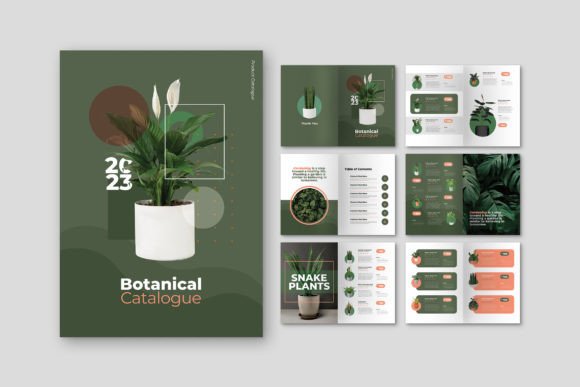
Professional Catalog Design That Saves You Time and Money
When you're running a business, creating a product catalog from scratch feels like reinventing the wheel every single time. You know the drill—hours spent wrestling with layout software, adjusting margins pixel by pixel, hunting for fonts that don't look amateur, and praying the final print doesn't come back looking like a different document entirely. The Catalog Plant Product template eliminates that entire headache, and honestly, it does so without sacrificing an ounce of quality.
What Makes This Template Stand Out
This isn't some generic download that falls apart the moment you try to customize it. The Catalog Plant Product is a modern, high-quality design built in Adobe InDesign with genuine professional standards in mind. It ships as both .indd and .idml files, which means whether you're running the latest Creative Cloud version or working with an older release, you're covered. The template includes 12 custom pages at A4 size (21cm x 29.7cm), giving you enough room to showcase a solid product range without bloating the layout with filler pages.
What immediately catches your attention is the visual balance. The design feels clean and contemporary—modern typography paired with generous white space that lets your product photography breathe. There's a sophistication here that works across industries, whether you're putting together a catalog for artisan ceramics, a seasonal fashion collection, a home goods line, or even a B2B parts inventory. The personality is versatile without being bland, polished without feeling sterile.
Built for Real-World Printing
One of the most frustrating things about many downloadable design assets is discovering they're not actually print-ready. You download the file, send it to your printer, and suddenly you're dealing with RGB color issues, missing bleed, or resolution problems that require last-minute fixes. The Catalog Plant Product template was created with production in mind from the start.
The document uses CMYK color format, which is exactly what professional print shops expect. At 300 DPI, every element is sharp and reproduction-ready. The 3mm bleed is already set up, so you won't get those awkward white edges when pages are trimmed. These details matter more than most people realize until they've wasted money on a bad print run.
The layers are neatly organized and use smart layer structure, which means swapping out placeholder images for your own product photos takes minutes rather than hours. Text frames, image containers, and decorative elements are all clearly labeled. If you've ever opened an InDesign file where everything was dumped onto a single layer, you understand how valuable this kind of organization is for your workflow.
Customization Without the Learning Curve
The template is fully editable, and that's not marketing speak—you can genuinely replace images, swap fonts, rearrange pages, and adjust the layout without the design falling apart. This is where the quality of the original construction shows. Poorly built templates collapse the moment you change a single element. This one holds its structure because it was designed with real editing scenarios in mind.
Free fonts are included, which is a practical touch that saves you from the common trap of downloading a template only to discover it uses premium typefaces you don't own. The typography choices complement the overall aesthetic—modern, legible, and appropriate for product presentation. If you prefer to use your own brand fonts, the text styles are straightforward enough to update globally without breaking the visual hierarchy.
For entrepreneurs and small business owners who aren't full-time designers, this matters enormously. You get a professional result without needing advanced InDesign skills. For working designers, it's a legitimate time-saver that frees you up to focus on creative direction rather than building layouts from zero.
Where This Template Works Best
Think about every situation where you need to present products in a polished, organized format. A seasonal catalog mailed to existing customers. A lookbook shared digitally with wholesale buyers. A product guide embedded on your website as a downloadable PDF. A printed booklet handed out at trade shows or pop-up events. The Catalog Plant Product template handles all of these scenarios because its design language is adaptable.
Publishers and content creators can use it for editorial-style product features. Marketers can build campaign-specific catalogs for promotions or launches. Bloggers running product-based businesses can create professional collateral that elevates their brand perception beyond what a basic website gallery achieves. Crafters and hobbyists selling through platforms like Etsy or at local markets gain an immediate credibility boost with a printed catalog that looks like it came from a design studio.
The A4 format is internationally recognized and fits standard distribution channels without custom sizing complications. Whether your audience expects a digital PDF or a physical printed piece, the dimensions translate seamlessly across both mediums.
Practical Tips for Getting the Most Out of It
Before you start customizing, take a few minutes to plan your content structure. Map out which products go on which pages, gather your highest-resolution product images, and write your copy ahead of time. This preparation turns the editing process into a smooth assembly rather than a chaotic scramble.
When replacing images, maintain the aspect ratios of the original placeholder frames whenever possible. The original layout was designed with specific visual proportions in mind, and respecting those proportions keeps the overall composition balanced. If you need to adjust frame sizes, work systematically through the spread rather than making isolated changes.
For font pairing decisions, consider how the template's existing type choices interact with your brand guidelines. If your brand uses a specific serif font for headings and a sans serif font for body text, test those combinations against the template's layout before committing. Sometimes the included fonts actually work better for catalog contexts than your primary brand typefaces, and that's perfectly acceptable for a standalone piece like this.
Always proof the final file at actual print size before sending it to production. Zoom to 100% on screen and check for text that might be too small to read comfortably, images that look pixelated, or spacing that feels cramped. The template's structure is solid, but your specific content might need minor adjustments to look its absolute best.
This is a design asset that respects your time and budget while delivering results that genuinely look professional. For anyone who regularly needs product catalogs, it's worth keeping in your toolkit.