Master Your Next Presentation: A Pitch Deck Template That Works
We have all been there: staring at a blank slide, trying to force a cohesive narrative out of a disjointed set of ideas. Whether you are a startup founder pitching for venture capital or a marketing manager presenting an annual report, the pressure to look polished is immense. That is exactly why we developed this Pitch Deck Presentation Slide Template. It is more than just a collection of pretty backgrounds; it is a comprehensive design system built to make your data look professional, organized, and visually compelling without requiring you to be a graphic design expert.
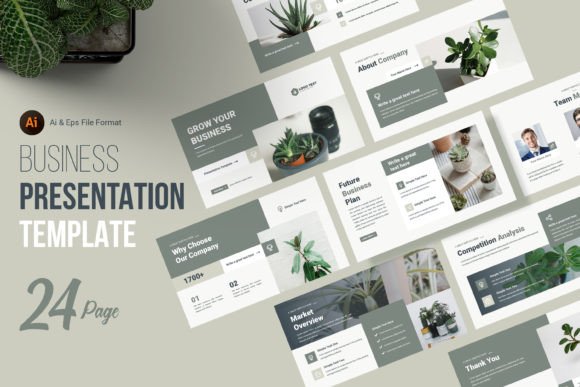
The visual personality of this template is defined by modern typography and clean geometry. We moved away from clutter, focusing instead on negative space and visual hierarchy. The design relies on strong, distinct headings that act as display font anchors, paired with highly readable body text that functions effectively as a sans serif font choice. This contrast ensures that your key points are understood instantly, while the supporting text remains easy on the eyes during long presentations. The aesthetic is versatile enough to feel corporate and trustworthy for a finance pitch, yet creative and bold enough for a lifestyle brand portfolio.
Transforming Marketing Materials into Visual Stories
While the title suggests a standard pitch, the utility of this file extends far beyond investor meetings. As a design asset, it is a powerhouse for transforming dry documents. Consider using these layouts for your company profile or as high-end flyers for a trade show. The structure is designed to handle packaging design mockups or service breakdowns with equal ease. Because the file is built in Adobe Illustrator (AI and EPS formats), you have complete control over the brand identity elements. You are not locked into a rigid PowerPoint environment; instead, you are working with premium font scalability and vector precision at a crisp 300dpi.
One of the most common pitfalls in presentation design is inconsistency. One slide uses a drop shadow, the next uses a flat color, and the fonts switch randomly. This template solves that by providing a strict, yet flexible, grid system. By utilizing the included guides and bleeds, you ensure that every page—from the introduction to the financial forecast—feels like part of the same story. This consistency builds trust with your audience. When they see a cohesive brand identity, they subconsciously perceive the presenter as more organized and reliable.
Practical Application: From Screen to Print
In the digital age, we often forget that presentations frequently end up as printed handouts. This is where the technical specs of this template shine. The 16x9 aspect ratio is standard for modern screens, but the vector nature of the files means it scales beautifully for editorial design or web design assets. If you need to repurpose a slide as a social media graphic for Instagram or LinkedIn, the high-resolution layers ensure your text remains sharp and your layout doesn't break.
We also understand that typography plays a massive role in how your message is received. That is why we utilized Google Fonts for the text elements. This is a practical choice for any content creator or small business owner. You do not need to purchase expensive commercial font licenses to edit the file. The font pairing included in the AI file has been carefully selected to balance personality with professionalism. However, if you have a specific serif font or script font that defines your brand, the organized layers make swapping typefaces a five-minute task rather than a five-hour headache.
Maximizing the Template: A Guide for Designers and Entrepreneurs
To get the most out of this package, approach it as a creative font and layout playground. The 24 unique slide designs are not just random pages; they are distinct solutions for different types of information. You have slides optimized for quotes, timelines, team introductions, and data visualization. As a designer or marketer, your job is to match the content to the layout that best serves the viewer's comprehension.
Here is a practical workflow for customizing the deck for your next project:
- Audit Your Content First: Before opening the file, map out your narrative. Do you have heavy data? Use the infographic slides. Are you introducing a team? Use the profile layouts. Do not force text onto a slide designed for imagery.
- Check the Color Palette: The file uses RGB color mode, perfect for digital delivery. However, if you are planning to turn this into packaging design or a physical brochure, convert your swatches to CMYK early in the process to avoid color shifting.
- Evaluate Font Pairings: While the default sans serif font works for almost everything, consider your audience. A tech startup might prefer the clean lines of the default, whereas a law firm might want to swap the headers for a traditional serif font to convey authority.
- Utilize Smart Objects: The template includes smart objects for image placement. This allows you to drag and drop your photos into pre-defined shapes without manually masking and resizing, saving you significant time during the editing phase.
It is important to note that while the Pitch Deck Presentation Slide Template provides the structure, the stock photos seen in previews are not included. This is actually a benefit. It forces you to use your own photography or high-quality stock that specifically matches your brand identity. Using generic stock photos can often cheapen a presentation; using custom imagery elevates it.
Ultimately, this template is a tool for clarity. In a world of information overload, your ability to present complex ideas simply is a competitive advantage. Whether you are a blogger pitching a collaboration, a hobbyist selling your first product, or a publisher outlining a new series, having a reliable, editable, and professionally designed foundation allows you to focus on what matters most: your message. Download the file, open the Illustrator layers, and start building a presentation that doesn't just share information, but sells a vision.